
Where can I create an online invitation for a holiday dinner?
Create a free online holiday dinner invitation, share its link, and collect RSVPs. Includes Thanksgiving, Christmas, and holiday dinner wording.
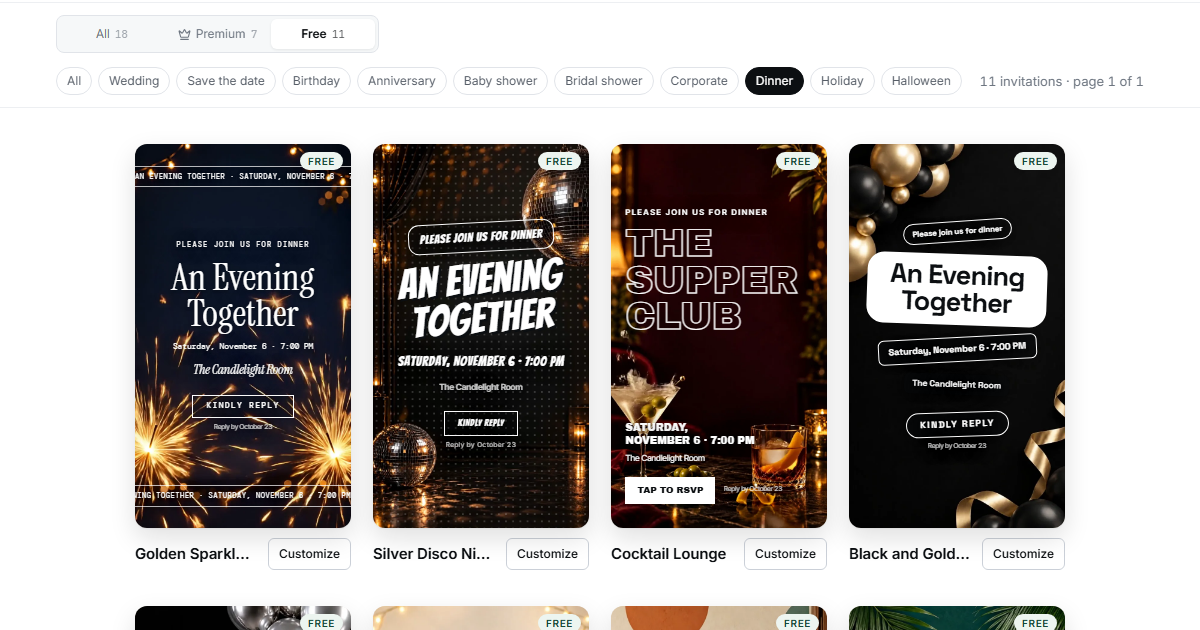
You can create a free online invitation for a holiday dinner on Confrmly. Choose a video and a text style labeled Free, add your dinner details, publish the invitation, and share its link. Guests can view the invitation and send a free RSVP without creating an account.
The invitation itself deserves as much attention as the reply form: guests need the occasion, place, arrival time, dinner time, and a clear invitation to join you. This guide covers that whole process, with original Thanksgiving, Christmas, and general holiday wording. The free video invitation guide explains the all-occasion workflow in more detail.
Key Takeaways
Create the invitation with both a Free video and a Free text style.
Say who is invited, when to arrive, and when dinner begins.
Publish before copying the invitation link for text or WhatsApp.
Guests need no account, but the RSVP form requires name, email, and attendance.
Check attending people, including permitted additional guests, before planning seats and food.
Step 1: Prepare the dinner details
Write down the facts before choosing your design. For a seated meal, “6:00 PM” can leave guests wondering whether that means arrival or dinner.
Have these details ready:
-
The occasion and host names.
-
The date, arrival time, and dinner time.
-
The venue or home address.
-
The people included in the invitation.
-
A reply-by date before you finalize shopping and seating.
-
A way to tell you about dietary needs.
If one household is invited, say which household members are included. If an invitation is for two named people, name them. Avoid an open-ended “bring everyone” when you have limited seats. Explain children's attendance or additional guests in the accompanying message rather than expecting the form to establish your guest boundaries.
Step 2: Create the free holiday invitation
Open the invitation catalog and explore the Dinner and Holiday categories for ideas. To create a free invitation, check the label on each selection. Choose a video labeled Free and a text style labeled Free; a category name alone does not establish that a design is free.
The current catalog includes Candlelit Birthday Dinner as a Free video in both Dinner and Holiday categories. You can adapt the occasion and wording for your meal. Its label was checked on October 17, 2026; check the current video label and choose a Free text style when creating yours.
-
Register as the host with your email and a password you choose. Follow any email-confirmation instructions shown.
-
Open Your events, then select Create invitation.
-
Choose the occasion and your Free video and Free text style.
-
Enter the occasion, date, time, venue, and invitation wording.
-
Check the preview and shorten any lines that are hard to read.
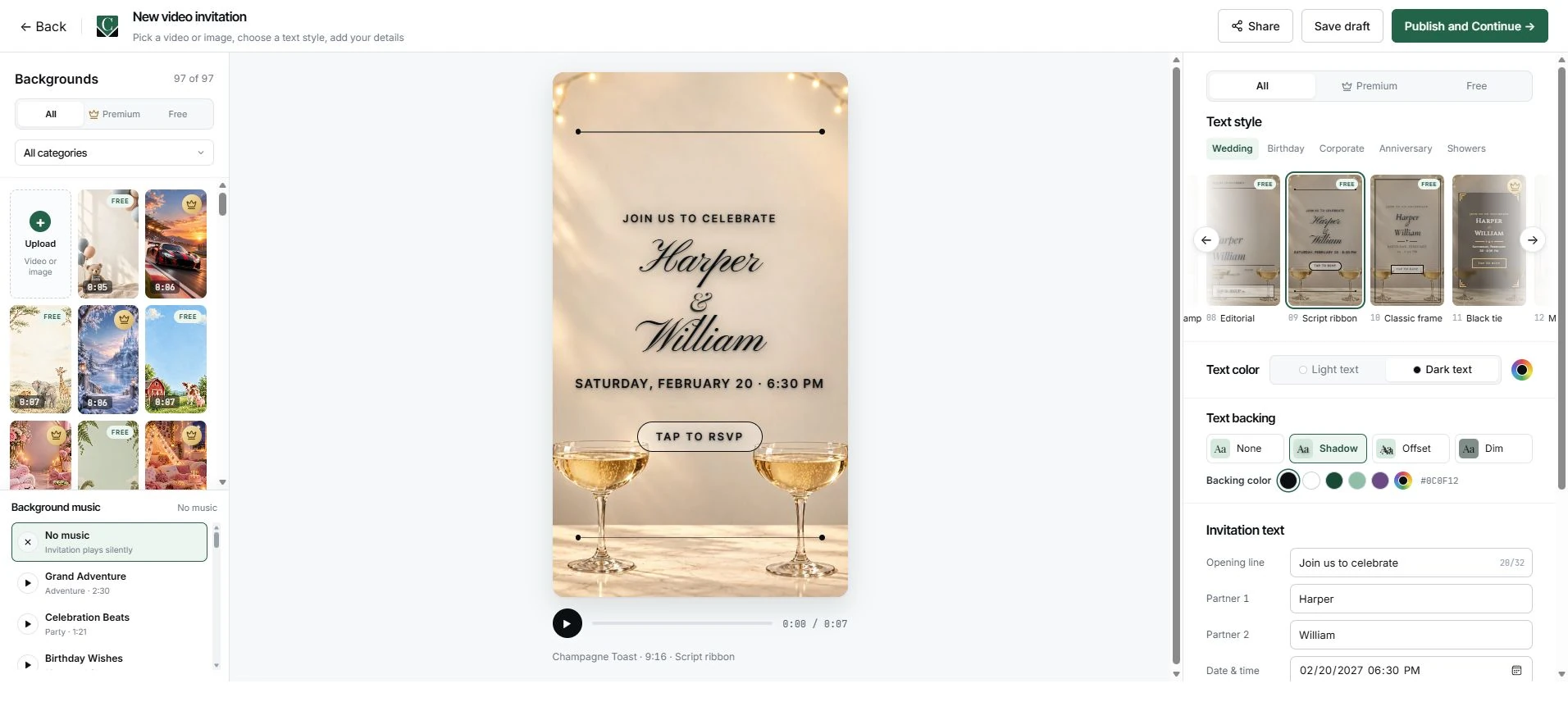
Use the invitation for the main facts. If the selected style does not show your reply date or longer instructions clearly, include them in the message you send with the link. Keep an ordinary-text summary there too, so guests can find the address and schedule without reading words over an animation.
Step 3: Publish and copy the invitation link
Publish the invitation when the details are ready. Saving a draft keeps your work available for editing; it does not publish the guest invitation.
-
Confirm the date, time, address, and both Free selections.
-
Choose Publish and Continue. Successful publication returns you to the event dashboard; complete any setup instructions shown.
-
Choose Edit invitation, then Share.
-
Under Invitation link, choose Copy link. Some supported devices may offer a native share sheet instead.
-
Open the copied guest link separately and check its details and RSVP route.
The invitation link and the dashboard's Copy RSVP Link are different addresses. Use the invitation link when you want guests to see the invitation you created.
Paste that link into a text or WhatsApp message. A video clip or screenshot can accompany it, but guests still need the browser link to reply. A standalone MP4 does not contain an interactive RSVP form. Share your guest invitation address, not the host editor, dashboard, or public demo.
Three holiday dinner invitation wording examples
These original examples use fictional people and addresses. Replace the sample details with yours, then put your copied invitation link where the example says [your invitation link]. The extra instructions can go in the accompanying message if they do not fit the design.
Thanksgiving dinner
Thanksgiving at the Morgan home
Thursday, November 26, 2026
Arrive at 3:30 PM; dinner at 4:00 PM
123 Example Lane
Please RSVP by November 16.
Accompanying message:
Jordan and Casey, we'd love to have you both at Thanksgiving dinner. This invitation is for the two of you. Open [your invitation link] for the details and RSVP by November 16. Please tell us about any dietary needs in the form if the field appears, or message us directly.
Christmas dinner
You're invited to Christmas dinner
Friday, December 25, 2026
Come at 5:00 PM; we'll sit down at 5:30 PM
The Rivera home, 456 Example Avenue
Please reply by December 15.
Accompanying message:
Avery, Sam, and the children are invited for Christmas dinner. Please let us know who can come by December 15 using [your invitation link]. Message us about dietary needs or anything we should discuss before planning the meal.
A general holiday gathering
A holiday dinner with friends
Saturday, December 12, 2026
Arrive at 6:00 PM; dinner at 6:30 PM
789 Example Street
Please RSVP by December 2.
Accompanying message:
Taylor, you're invited to our holiday dinner, and you're welcome to bring one guest. Open [your invitation link] and reply by December 2. Let us know whether you will bring someone so we can set enough places.
Step 4: Check the guest RSVP questions
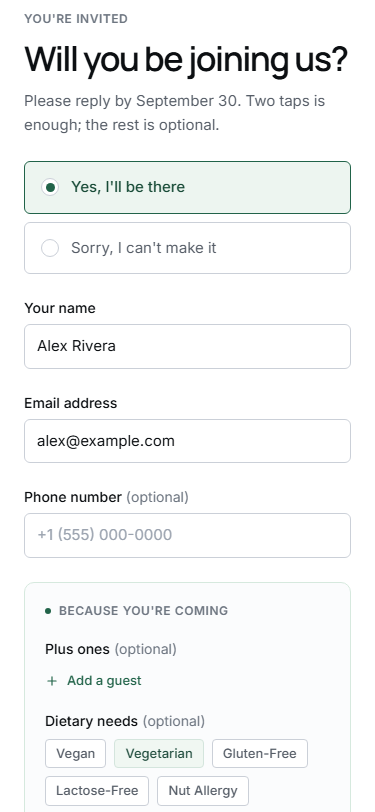
Guests reply without registering, but they still enter their name, email, and attendance. Additional questions depend on the event settings and attendance choice. Check your own form before telling guests they can enter dietary information or add another person.
If you collect dietary requests through an enabled field, check the answers before deciding on the menu. Otherwise, ask guests to contact you directly. Clarify anything uncertain with the guest; an empty field is not a reliable statement that no dietary needs exist.
Step 5: Turn replies into a dinner headcount
Count attending people when planning places and portions. A response row may include a permitted additional guest, so confirmed replies and attending people can differ. Reconcile the answers with the households and named guests you actually invited.
The RSVP tracking guide covers organizing responses. Review outstanding invitations when your reply date arrives. The date tells guests when you need an answer; do not assume it closes the form automatically.
For missing replies, send a personal message. The guest follow-up guide offers wording you can adapt. Confirm the people coming and any dietary notes before you finalize the meal.
Check everything before sending
Open the exact guest invitation link you will share, then confirm:
-
The video and text style both say Free.
-
The occasion, date, address, arrival time, and dinner time are correct.
-
Your message names the invited people and any permitted additional guest.
-
Guests can find the reply-by date and reach the RSVP form.
-
Dietary instructions match the available form or give a direct contact option.
Once those details are clear, send the invitation link with a short personal message. The free invitation sets out the evening; the free RSVP helps you plan for the people coming.
Editorial note: This product guide uses existing editor and public demo screenshots as interface examples. They do not show a published holiday event, saved holiday RSVPs, or physical-phone testing. For a product question or correction, use the contact page.
Ready to send invites?
Create your event on Confrmly
Set up your RSVP page, share the link with guests, and keep their responses in one place.
Get Started Free